
Searching images by filename is a dead end. You know a picture of "black nike shoes" is in the folder somewhere, but unless someone typed those exact words into the filename, no amount of Ctrl+F will find it. What you actually want is to search by meaning: describe the picture in plain English and get it back.
That is exactly what a semantic image search engine does, and with Ultralytics solutions and OpenAI CLIP you can build one over your own images in a handful of lines. In this guide we build a searchable index over a folder of fashion images and query it with natural language, no labels and no training required.
What is semantic image search
Traditional search matches strings. Semantic search matches ideas. Instead of comparing your query text to filenames or manual tags, it compares the meaning of your query to the content of each image.
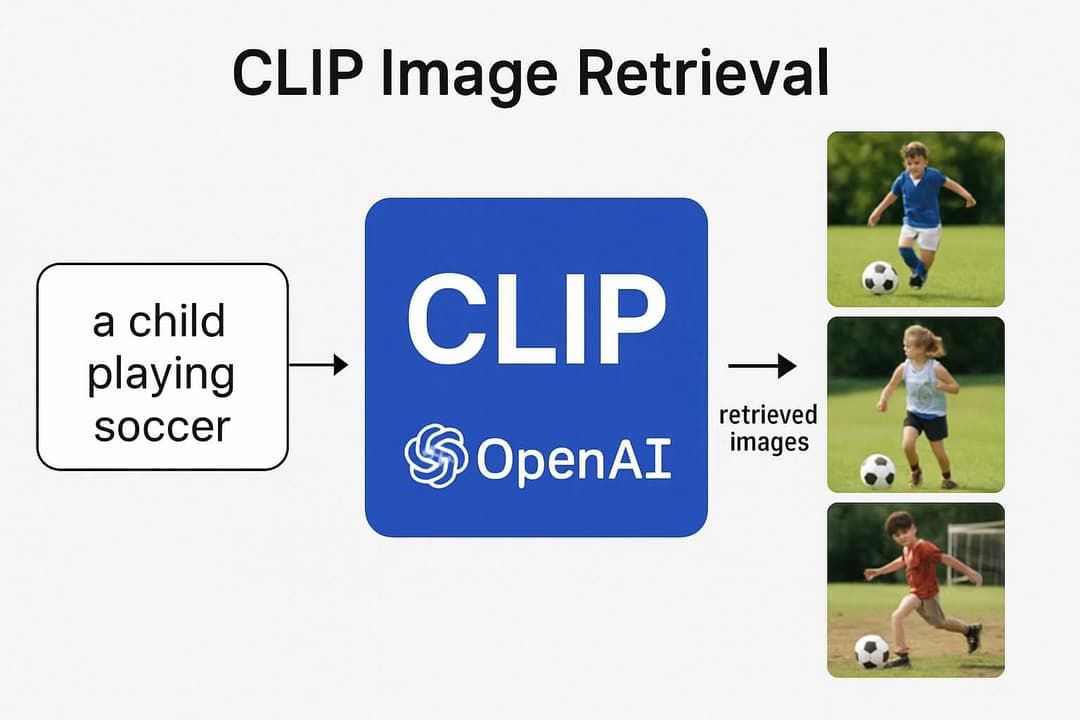
The engine here is CLIP, a model from OpenAI with two encoders:
- a vision encoder that turns an image into a vector (an embedding), and
- a text encoder that turns a sentence into a vector in the same space.
Because both encoders share one embedding space, a photo of red sunglasses and the phrase "red sunglasses" land close together. Search then becomes a distance problem: encode the query, and return the images whose embeddings sit closest to it, ranked by cosine similarity.
A few things make this approach easy to reach for:
- Zero-shot. No training on your dataset. It works on raw images out of the box.
- No labels. You never tag a single image. The pixels are the index.
- Natural language. Queries are plain English, from "Adidas t-shirts" to "a happy child in nature".
- Fast queries. Building the index takes a moment up front, but each search after that is near-instant.
How it works
The flow is short: every image is encoded once into an embedding and stored in a search index. At query time your text is encoded the same way, and the index is ranked by similarity to return the best matches.
What you need
Install Ultralytics, which pulls in everything the solution needs:
pip install ultralytics
Then gather your images into a single folder. For this walkthrough we use a dataset named fashion-images, but any directory of pictures works: your own product catalog, a photo archive, or a dataset you downloaded. A GPU speeds up indexing and search, but it is not required.
If you want a ready-made set to follow along, the Fashion Product Images (Small) dataset on Kaggle (~44k images) is a great fit for the queries in this guide. There is also a full-resolution version if you want larger images. Download it, unzip it, and point data at the folder of images.
The full script
Here is the complete script. Save it as semantic-search-fashion-data.py, point data at your image folder, and run it. We walk through the important parts right after.
from ultralytics import solutions

app = solutions.SearchApp(
    data="fashion-images",  # Optional, build the search engine with your own images
    device="cuda"           # Set the device: "cpu" or "cuda" / "0"
)

app.run(debug=False)  # Use debug=True while testing
That is the whole thing. solutions.SearchApp launches a small web interface where you type a query and see the matching images ranked by relevance. Under the hood it encodes every image in data, builds the search index once, and then serves your queries.
How the code works
Point it at your images
The data argument is the folder of images you want to search. It is optional; leave it out and the solution falls back to a default images directory. Give it your own folder to make the engine yours:
app = solutions.SearchApp(data="fashion-images")
Every image in that folder becomes part of the searchable index.
Choose a device
The device argument controls where the encoding runs. Use "cpu" for a laptop or "cuda" (or a specific index like "0") when you have a GPU:
app = solutions.SearchApp(data="fashion-images", device="cuda")
The GPU matters most while the index is being built, since that is where every image gets encoded.
Launch the app
app.run() starts the web server. Open the printed local URL in your browser and start typing queries. Set debug=True while you are experimenting and debug=False for a cleaner run:
app.run(debug=False)
Try these queries
Once the app is up, search the fashion collection the way you would describe the pictures to a friend:
black nike shoes
blue color t-shirts
Women handbags
Red sunglasses
Adidas t-shirts
Women home slipper
suitcase designs
branded Hand watch
T-shirts with bike logo
men's dressing shoes
Black color socks with nike logo
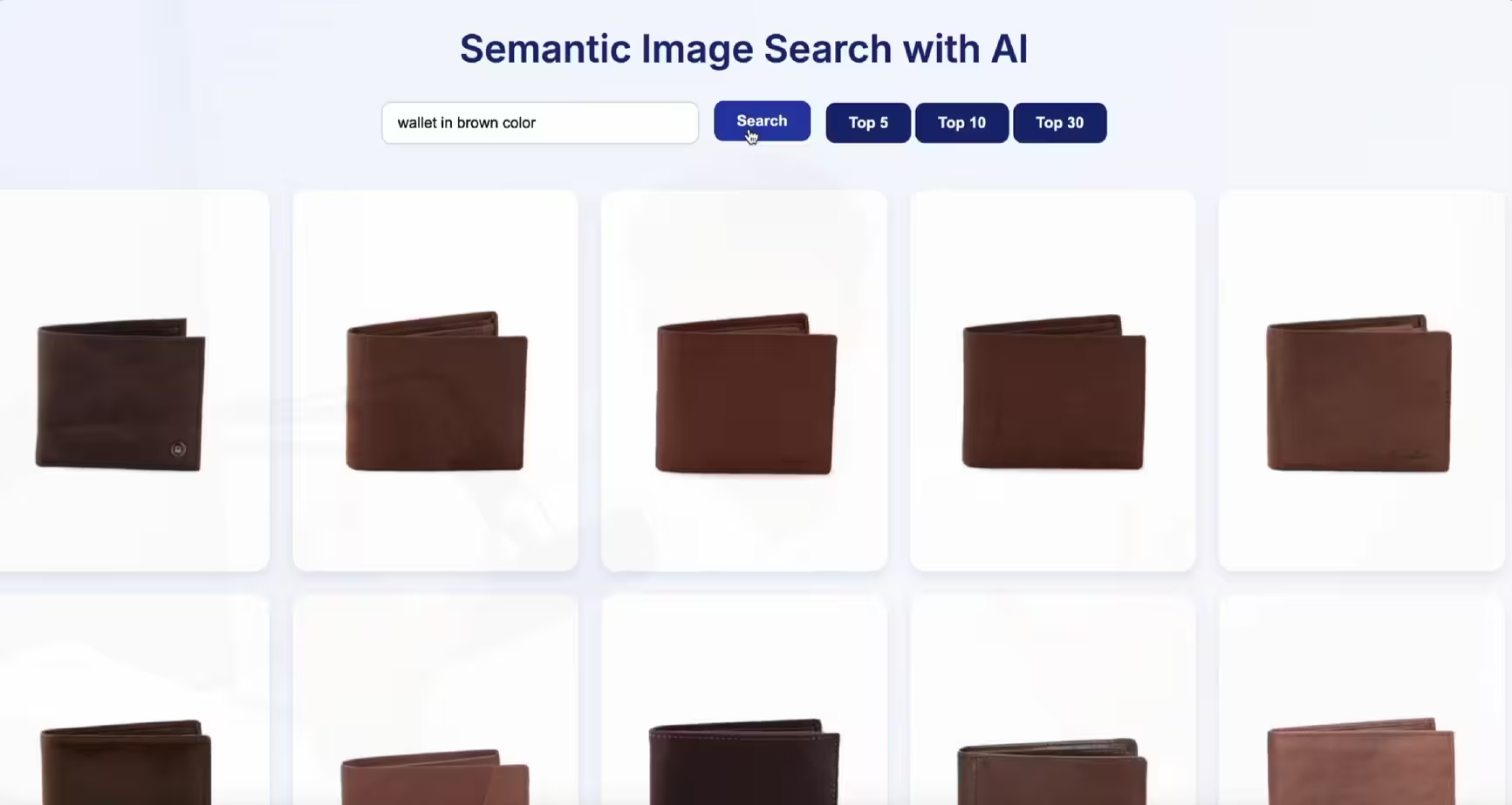
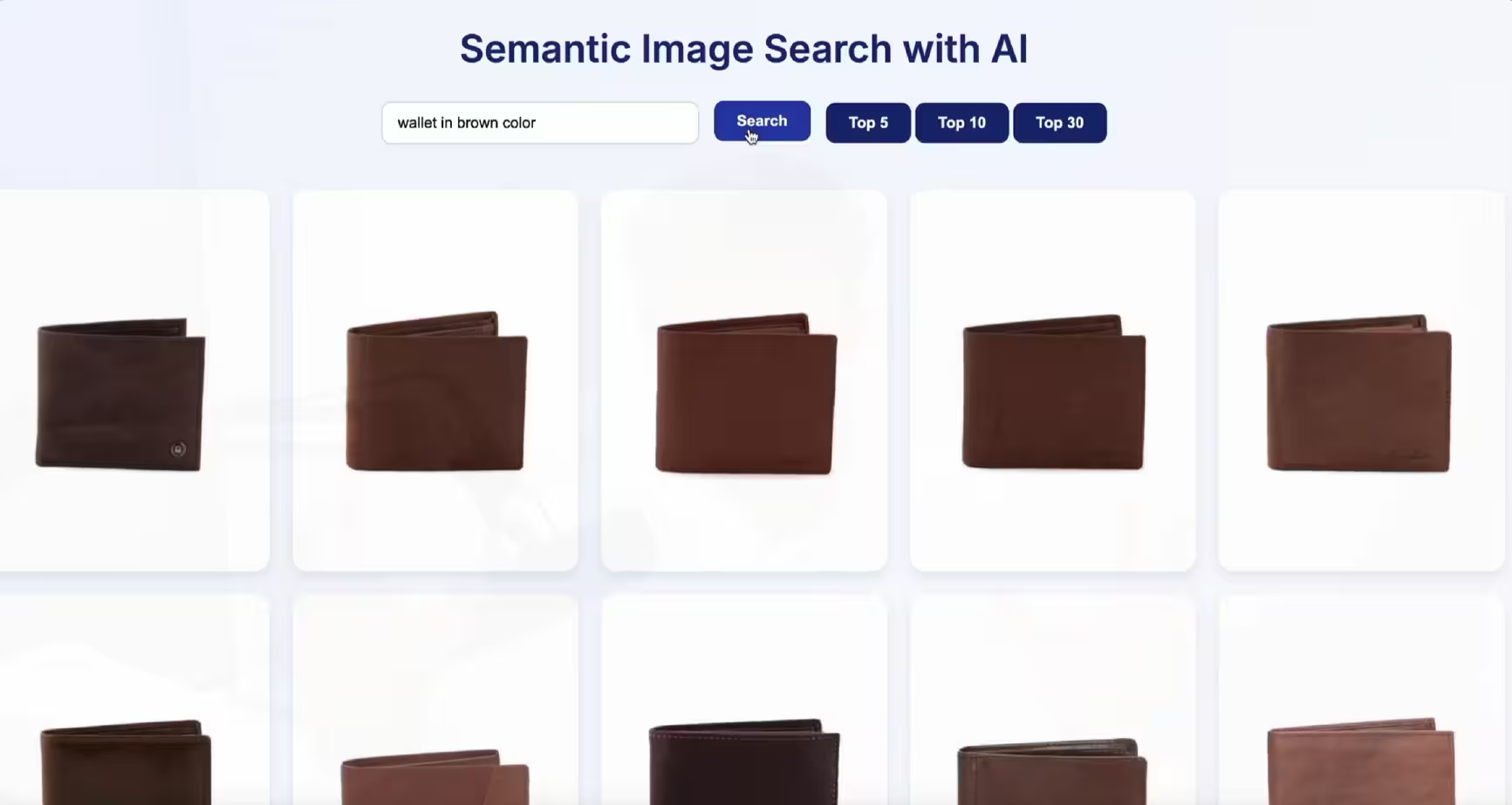
wallet in brown color
Notice that none of these queries depend on filenames or tags. "T-shirts with bike logo" finds the right shirts because CLIP understands what is in the image, not what it is called.
Search from code instead of the browser
Sometimes you do not want a web app, you want the results inside your own program, for example to power a product search API. For that, use VisualAISearch, which returns matches directly:
from ultralytics import solutions

searcher = solutions.VisualAISearch(
    data="fashion-images",  # Optional, your image directory
    device="cuda"           # "cpu" or "cuda" / "0"
)

results = searcher("black nike shoes")
print(results)
searcher(query) returns the images that best match your text, ranked by similarity, so you can plug the results straight into whatever you are building.
Additional arguments
| Argument | Type | Default | Description |
|---|---|---|---|
data |
str |
"images" |
Path to the image directory to index and search. |
device |
str |
None |
Where to run: "cpu", "cuda", or a device index like "0". |
A note on the first run
The first time you run the script, it encodes every image and builds the search index. This is a one-time cost. On a large collection it can take roughly 10-15 minutes, but once the index exists your searches return almost instantly. Only the initial indexing step is slow; everything after that is fast.
Where this is useful
A semantic image search engine is handy anywhere you have more pictures than patience:
- E-commerce: let shoppers search a catalog with descriptions like "brown leather wallet" instead of rigid filters.
- Photo archives: find "the beach photo from that trip" without ever tagging a single image.
- Creative and design: pull visual references and inspiration by describing the look you want.
- Media libraries: search stock and asset collections by concept, not keyword.
- Datasets: quickly locate and audit specific kinds of images inside a large training set.
Tips for better results
- Use a GPU for large sets. Indexing thousands of images is far quicker on CUDA, and search stays snappy.
- Describe attributes, not just objects. Colors, brands, and materials ("black nike shoes", "brown color wallet") sharpen the match.
- Send clean images. Clear, well-lit pictures embed better than dark, blurry ones.
- Re-index when the folder changes. Add or remove images and rebuild so the index reflects what is actually there.
Wrapping up
Semantic image search turns a plain folder of pictures into something you can talk to. With SearchApp for a ready-made web interface and VisualAISearch for code, a few lines of Python give you meaning-based search over your own images, no labels and no training.
If you are building visual search or other computer vision features and want a hand, book a free consultation or read more tutorials. 🚀
FAQs
- Q:What is semantic image search?
- A:Semantic image search finds pictures by meaning rather than filename or tags. You type a query like 'black nike shoes' and get the images that match the idea, even if none of them were ever labelled with those words.
- Q:How does CLIP power the search?
- A:CLIP has two encoders, one for images and one for text, that project both into the same embedding space. Your query and every image become vectors in that space, and the closest vectors to your query are the best matches, ranked by cosine similarity.
- Q:Do I need to label or train anything?
- A:No. The search is zero-shot: it works directly on raw images with no manual labels and no fine-tuning. You point it at a folder of images and start searching in plain English.
- Q:Do I need a GPU?
- A:No. It runs on CPU and on GPU. A GPU makes building the index and running queries much faster, which matters for large image collections, but a CPU is fine for smaller sets and testing.
- Q:Why does the first run take a few minutes?
- A:The first run encodes every image into an embedding and builds the search index. That is a one-time cost. After the index is built, queries return almost instantly, so only the initial indexing step is slow.
Related posts
Video Depth Anything in Python: consistent depth for video
Depth Anything V2 run frame by frame flickers on video. Video Depth Anything fixes that with temporally consistent depth for long clips. Here is how to run it in Python, with the command line and a reusable script.
Read article →
How to use ByteTrack with YOLO for object tracking in Python
Give YOLO a memory. This tutorial uses ByteTrack to assign persistent IDs to objects across video frames, with a runnable Ultralytics script and a bytetrack.yaml tuning guide.
Read article →
Depth Anything V2 in Python: depth from image, video or webcam
How to estimate depth from a single image, a video, or your webcam with one clean, reusable Python class, and how V2 compares to V1 and Depth Anything 3.
Read article →
Computer Vision Engineer and top contributor to the YOLO project, building production AI and deep learning systems.
My course on LinkedIn LearningHands-On AI: Computer Vision Projects with Ultralytics and OpenCV